

Custom/Generic app
You can create and deploy arbitrary apps with jhub-apps, including Python apps, Node.js servers, Go applications, Ruby apps, or any executable that can run as a web server.
Environment requirements
Section titled “Environment requirements”Your conda environment (used in JHub Apps Launcher’s App deployment form) should have:
- The runtime/executable for your app (Python, Node.js, Go, Ruby, etc.)
- Custom framework used for the app
- Other libraries/dependencies used in the app
Note: jhsingle-native-proxy is no longer required - JHub Apps now uses jhub-app-proxy which is automatically installed when deploying custom apps.
App deployment form requirements
Section titled “App deployment form requirements”In the JHub Apps Launcher App deployment form, select “Custom Command” for the “Framework”. A text field input for a “Custom Command” is displayed.
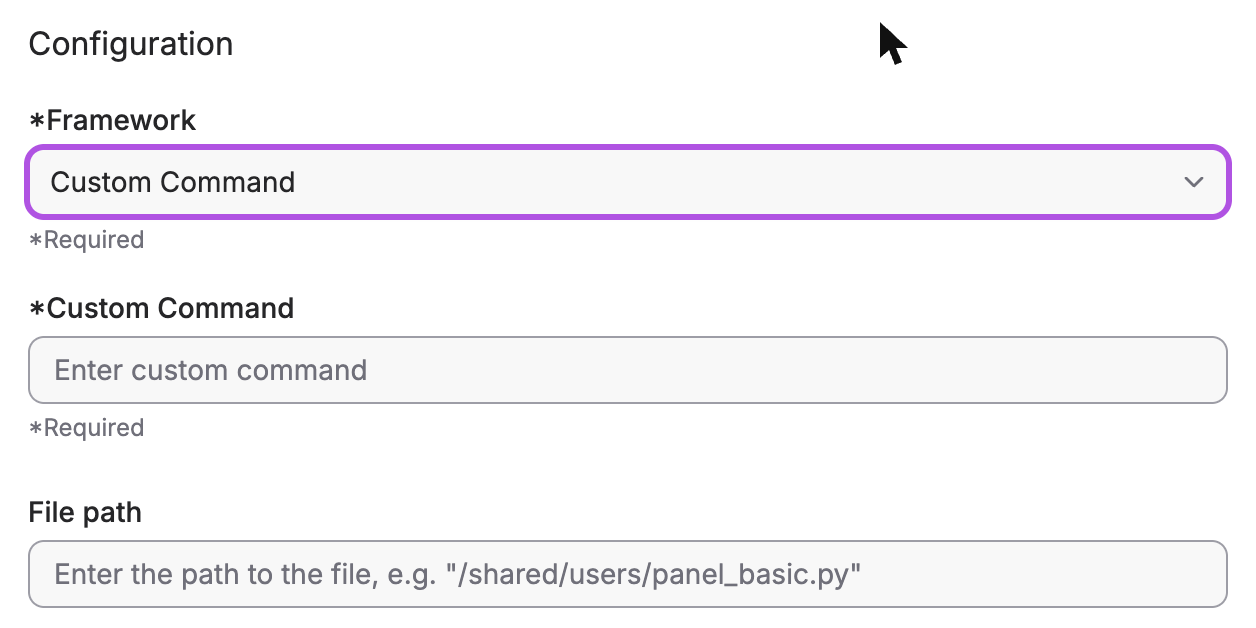
Command format
Section titled “Command format”The Custom Command field accepts the complete command to run your application. The command should be exactly as you would run it, with the following consideration:
- Use
{port}as a placeholder for the port number - JHub Apps will substitute this with the actual port allocated by JupyterHub
Examples
Section titled “Examples”Python applications
Section titled “Python applications”Python HTTP server:
python -m http.server {port}Flask application:
python -m flask run --port {port} --host 0.0.0.0Python script:
python /path/to/app.py {port}Custom Python module:
python -c "from mymodule import app; app.run(port={port})"Non-Python applications
Section titled “Non-Python applications”Node.js server:
node server.js --port {port}Go application:
./my-go-app --port {port}Ruby server:
ruby app.rb -p {port}Shell script:
bash /path/to/start.sh {port}Advanced configuration
Section titled “Advanced configuration”Environment variables
Section titled “Environment variables”You can set environment variables for your custom app through:
- Via the UI: Add environment variables in the app creation form
- Via configuration: Set environment variables in
startup_appsconfiguration
Example using startup_apps:
c.JAppsConfig.startup_apps = [ { "username": "my-user", "servername": "my-custom-app", "user_options": { "display_name": "My Custom App", "filepath": "app.py", "framework": "custom", "custom_command": "python app.py {port}", "env": { "MY_VAR": "value", "DEBUG": "true" }, "conda_env": "my-env" } }]Custom proxy arguments
Section titled “Custom proxy arguments”You can override or add additional arguments for the jhub-app-proxy CLI using the JHUB_APP_PROXY_ARGS environment variable. This allows you to customize health checks, timeouts, logging, and other proxy behavior on a per-app basis.
Via the UI:
Add an environment variable in the app creation form’s Environment Variables section:
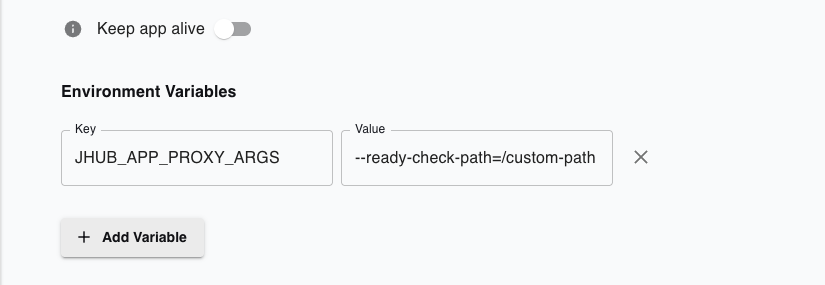
Via configuration:
c.JAppsConfig.startup_apps = [ { "username": "my-user", "servername": "my-app", "user_options": { "display_name": "My App", "framework": "streamlit", "filepath": "app.py", "env": { "JHUB_APP_PROXY_ARGS": "--ready-check-path=/health --ready-timeout=600" } } }]Common arguments:
--strip-prefix: Controls whether the JupyterHub service prefix is stripped before forwarding requests to your app (default:true)- When to use
true(default): Most apps (Streamlit, Panel, Gradio, etc.) expect requests without the JupyterHub prefix- Example:
/user/admin/my-app/index.html→ forwards as/index.html
- Example:
- When to use
false: Apps that handle their own base URL configuration (like JupyterLab withServerApp.base_url)- Example: To override for a custom app that manages its own base URL:
JHUB_APP_PROXY_ARGS="--strip-prefix=false"
- Example: To override for a custom app that manages its own base URL:
- When to use
--ready-check-path: Health check endpoint path (default:/)--ready-timeout: Health check timeout in seconds (default:300)--log-level: Log level -debug,info,warn,error(default:info)--log-format: Log format -json,pretty(default:json)
For a complete list of available arguments, see the jhub-app-proxy documentation.
Duplicate argument handling:
If an argument is already set by the framework configuration (e.g., --ready-check-path=/ for Gradio), providing it via JHUB_APP_PROXY_ARGS will override the default value. The environment variable takes precedence.
Custom proxy version
Section titled “Custom proxy version”You can specify a custom version of jhub-app-proxy to use:
Per-app (via environment variable):
"env": { "JHUB_APP_PROXY_VERSION": "v0.6"}Globally (in jupyterhub_config.py):
c.JAppsConfig.jhub_app_proxy_version = "v0.6"Priority: App-specific environment variable > Global config > Default